ShopSite Elite Theme
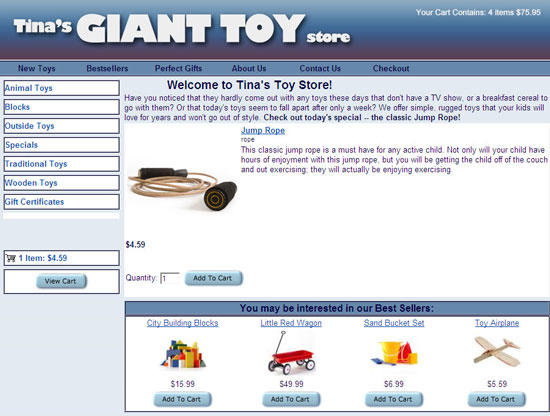
Version Added: ShopSite Version 8.0
Color Options: Blue, Green, Orange, Salmon, Silver, Tan, USA
The Elite Theme is setup to give you as the merchant many options to customize your pages. The header section in this template is completely open so you would be able to add your own header to fill the whole header section with text, graphics or by using your own code (such as HTML).
Theme Colors & Backgrounds
Colors and background images for this theme can be modified under Preferences > Layout Settings.
- Text Color - used as the text color on your pages.
- Background Color - used as the whole page background color, including link background color.
- Link Color - used as the link color.
- Visited Link Color - used as the visited link color.
- Active Link Color - used as the active/hover link color.
- Table Shade Color - used as the table shade color in the shopping cart.
- Background Image - if used the background image will override the background color for the page background, but will not override the background color in the main body or the background color of the left links.
Theme Files
- elite_001_pa_template.sst - page template for the Elite theme.
- core_001_pa_basic_page.sst - code for main body of the page template.
- elite_001_pr_template.sst - product template for the Elite theme.
- core_001_pr_basic_moreinfo.sst - code for main body of the product more information page.
- elite_001_gc_template.sst - gift certificate template for the Elite theme. This template controls the look and feel of the gift certificate order screen as well as the format of the printable and digital gift certificates.
- elite_001_tf_template.sst - tell a friend template for the Elite theme. This template controls the tell a friend pop up window as well as the tell a friend email.
- elite_001_sc_template.sst - shopping cart template for the Elite theme. This template controls all of the checkout screens as well as the customer order email receipt.
- elite_001_cr_template.sst - customer registration template for the Elite theme. This template controls all of the customer registration screens as well as any customer registration emails.
- elite_001_se_template.sst - search results template for the Elite theme. This template controls the basic layout for the search results screen.
- elite_001_se_page_template.sst - search link result template for the Elite theme. This page template controls how the search results which are page links are formatted on the search result screen.
- elite_001_se_prod_template.sst - search product result template for the Elite theme. This product template controls how the search results which are products are formatted on the search result screen.
- core_001_se_basic_page.sst - code for main body of the search results page.
- elite_001_cr_styles.css - CSS for the customer registration screens using the Elite theme.
- elite_001_cr_vars.sst - VARS for the customer registration screens using the Elite theme including colors used.
- elite_001_gc_styles.css - CSS for the gift certificate screen using the Elite theme.
- elite_001_gc_vars.sst - VARS for the gift certificate screen using the Elite theme including colors used.
- elite_001_pa_styles.css - CSS for the pages using the Elite theme.
- elite_001_pa_vars.sst - VARS for the pages using the Elite theme including colors used.
- elite_001_pr_styles.css - CSS for the product more information pages using the Elite theme.
- elite_001_pr_vars.sst - VARS for the product more information pages using the Elite theme including alignment and how colors are used.
- elite_001_sc_styles.css - CSS for the shopping cart pages using the Elite theme.
- elite_001_sc_vars.sst - VARS for the shopping cart pages using the Elite theme including how colors are used.
- elite_001_se_styles.css - CSS for the search result screens using the Elite theme.
- elite_001_se_vars.sst - VARS for the search result screens using the Elite theme including how colors are used.
- elite_001_tf_styles.css - CSS for the tell a friend pop up using the Elite theme.
- elite_001_tf_vars.sst - VARS for the tell a friend pop up using the Elite theme including how colors are used.
Enhance This Template
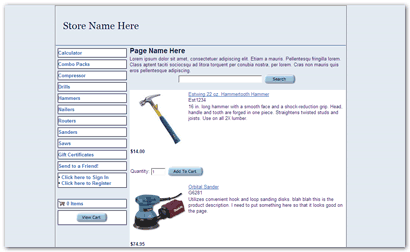
Get This Look
Add the following code into the header field. Replace "Store Name Here" with the name of your store.
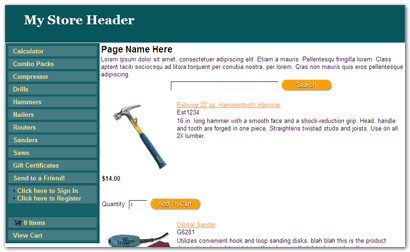
Change The CSS To Get A New Look
Go to Merchandising > Custom Templates > Includes > New Include, and name a new include file "elite_001_pa_styles.css" then paste the code below into that file.