ShopSite Congruence Theme
Version Added: ShopSite Version 10
Color Options: Black, Blue, Clear Tabs, Happy Blue, Green, Orange, Red, Slate Pink, Yellow
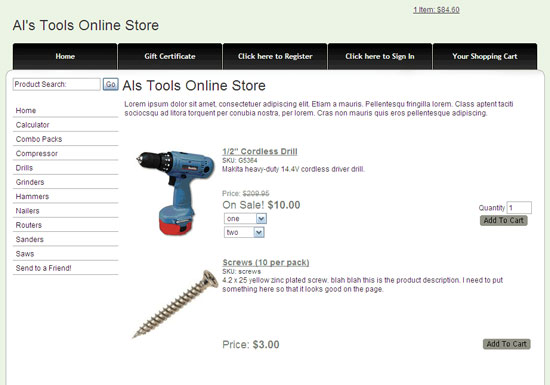
The Congruence Theme includes both page links down the left, and store links at the top. The white background color cannot be changed, but you can change the page background color or image. Most of the color options include the color for the tabs at the top. If you would like to change the color of those tabs you can go to Preferences > Themes > and select the "Clear Tabs" color option for the congruence theme. This will allow you to specify both the tab color, and the tab hover color. One unique feature within this template is how the subproducts are displayed (see below).
Theme Colors & Backgrounds
Colors and background images for this theme can be modified under Preferences > Layout Settings.
- Text Color - used only as the text color.
- Background Color - used as the page background color.
- Link Color - used as the link color for links appearing in the main body of the page. If you are using the "Clear Tabs" color scheme, then the link color also controls the color of the tabs at the top of the screen.
- Visited Link Color - used as the product price color. If you are using the "Clear Tabs" color scheme, then the visited link color also controls the color of the tabs at the top of the screen when hovered over.
- Active Link Color - used as the roll over color for links on the left and in the main body, as well as the color of the buttons.
- Table Shade Color - used only as the table shade color for products on the shopping cart screen.
- Background Image - will override the page background color if used.
Subproducts
The Congruence Theme displays subproducts different than other ShopSite themes. Subproducts are displayed in a pull down menu. If you would like the parent product to be listed in the pull down menu as well, you can add the parent product as a subproduct of itself. This will make is so that the parent product is listed in the pull down menu along with the subproducts. An example of this can be seen below. Each of the options within the pull down menu is it's own product.
Not using this theme but want to have your subproducts displayed how the Congruence theme displays them? Click here to learn how you can add this subproduct feature to your custom template.
Theme Files
- Congruence.sst - page template used for the congruence theme.
- Congruence-Product.sst - product template used for the congruence theme.
- Congruence-GiftCert.sst - gift certificate template for the congruence theme which controls how the gift certificate ordering page looks, how the gift certificate email receipt looks, and how the printable email receipt within the back office looks.
- Congruence-TellAFriend.sst - tell a friend template for the congruence theme which controls how the tell a friend pop up looks, as well as how the tell a friend email looks.
- Congruence-Cart.sst - shopping cart template for the congruence theme which controls how all the pages of the shopping cart look, how the order email receipt looks as well as how the cross sell items are laid out on the shopping cart screens.
- Congruence-cr.sst - customer registration template for the congruence theme which controls how all of the customer registration screens look, as well as how the customer registration emails look.
- Congruence-Search.sst - search template for the congruence theme which controls the layout of the search results screen.
- search_link - default link template for page links on the search results screen.
- CurvedSearchProductTemplate.sst - product template which is used by a few themes including the congruence theme to control how the products appear on the search results screen.
- Congruence-cart.css - include file with CSS for the shopping cart screens and controlling elements on those screens only.
- Congruence-Colors.sst - include file which assigns the appropriate tab image to the color scheme it goes with.
- Congruence-crHeader.sst - include file containing the code for the top of the customer registration screens including starting the form, pulling CSS and creating the HEAD section.
- Congruence-crFooter.sst - include file containing the code for the bottom of the custom registration screens including ending the form and closing the BODY and HTML.
- Congruence-MiniCart.js - include file containing the JavaScript for the mini cart.
- Congruence-MoreInfoPage.sst - include file which controls how the more information page looks.
- Congruence-Registration.sst - include file containing the CSS, HTML and JavaScript for the customer registration tabs at the top of the page screens.
- Congruence.css - include file containing the general CSS for this template used on all screens.