ShopSite Gradient Theme
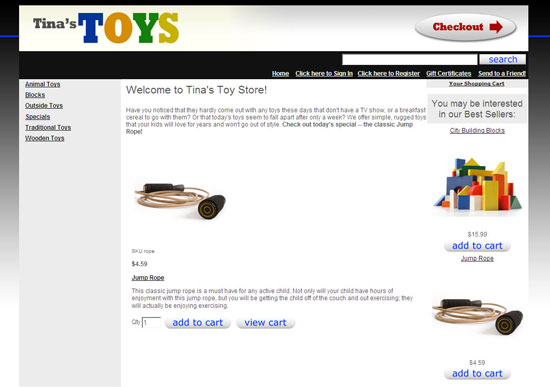
Version Added: ShopSite Version 8.1
Color Options: Accent Blue, Accent Red, Dark Blue, Fiesta
The Gradient Theme was the first theme to include left links as well as top links AND a right side bar. The links on the left are the page links you have assigned to each page. The top links are the ShopSite features including the search bar, home link, gift certificate link and customer registration links. The right side bar is comprised of the mini cart and the text three field.
Theme Colors & Backgrounds
Colors and background images for this theme can be modified under Preferences > Layout Settings.
- Text Color - used as the text color for your pages.
- Background Color - used as the main body background color and the page background color.
- Link Color - used as the top bar background color, the shopping cart link color, and the visited link color for links on the left navigation bar.
- Visited Link Color - used as the link color for the left navigation links and links in the main body of the page, as well as the hover color for the shopping cart link.
- Active Link Color - used as the left navigation color, as well as the link color for the top navigation links.
- Table Shade Color - used as the table shade color on the shopping cart pages.
- Background Image - used as the background image on your pages. Only repeats horizontally.
Theme Files
- gradient1-page.sst - page template used by the Gradient theme.
- gradient1-product.sst - product template used by the Gradient theme.
- gradient1-gc.sst - gift certificate template used by the Gradient theme. Controls how the gift certificate purchase screen looks, as well as how the printable and email/digital gift certificates looks.
- gradient1-tf.sst - tell a friend template used by the Gradient theme. Controls how the tell a friend pop up looks, as well as the tell a friend email.
- gradient1-sc.sst - shopping cart template used by the Gradient theme. Controls how the shopping cart, checkout, confirmation, thank you and email receipt look.
- gradient1-cr.sst - customer registration template used by the Gradient theme. Controls how all the customer registration screens appear as well as any emails to the customer regarding their account.
- gradient1-search.sst - search results template used by the Gradient theme.
- gradient1-cr-cgi.js - JavaScript for the customer registration links in the Gradient theme on the shopping cart pages.
- gradient1-cr.css - css used on the customer registration screens for the Gradient theme.
- gradient1-cr.js - JavaScript for the customer registration links in the Gradient theme.
- gradient1-crFooter.sst - code used at the bottom of the customer registration screens for the Gradient theme.
- gradient1-crHeader.sst - code used at the top of the customer registration screens for the Gradient theme.
- gradient1-gc-em.css - css used in the gift certificate email for the Gradient theme.
- gradient1-gc-pr.css - css used in the printable certificate for the Gradient theme.
- gradient1-gc.css - css used on the gift certificate screen for the Gradient theme.
- gradient1-link.sst - code for the left navigation links in the Gradient theme.
- gradient1-mc.css - css for the mini cart used in the Gradient theme.
- gradient1-mi.css - css used on the product more information pages for the Gradient theme.
- gradient1-MiniCart.js - JavaScript for the mini cart in the Gradient theme.
- gradient1-pa-vars.sst - sets the VARS for the page including widths, colors and includes.
- gradient1-pr-vars.sst - sets the VARS for the product including widths, text wrap, colors and includes.
- gradient1-sc.css - css used on the shopping cart pages for the Gradient theme.
- gradient1-se.css - css used on the search results screen for the Gradient theme.
- gradient1-vars.sst - sets the defaults for the Gradient theme including widths, colors, and which CSS file is used where.
- gradient1.css - main css for the Gradient theme.
Enhance This Template
The Gradient Theme uses the background image to add a gradient on the page. Below are additional gradients that you can save to your desktop, upload into your ShopSite store and use on your store pages.
- Save Image To Desktop - Click the image to get the actual image in a new window. Save the image to your desktop. If you are using a PC you can right mouse click the image and select "Save Image As" to save the image to your desktop.
- Upload Image To Store - Upload the image into your ShopSite store by going to Images > Upload an Image.
- Set Image As Background Image - Set the image you have uploaded as the background image for all screens within your ShopSite store. You would do this for your pages by going to Pages > Edit Page Layout. You can set this image as the background image for your more information page by going to Preferences > More Info. For the shopping cart pages you would go to Commerce Setup > Order System > Layout Info, and set the background graphic there.








Stretch Header Across Page
In some browsers and in newer versions of other browsers, the top search bar does not stretch across the entire page. You can fix this issue by adding a small amount of code into the header or footer field on your pages. Copy and paste the code below into your ShopSite store.