ShopSite Sidebar Theme
Version Added: ShopSite Version 7
Color Options: Black, Blue, Blue2, Blue/Green, Green Orange, Primary, Red
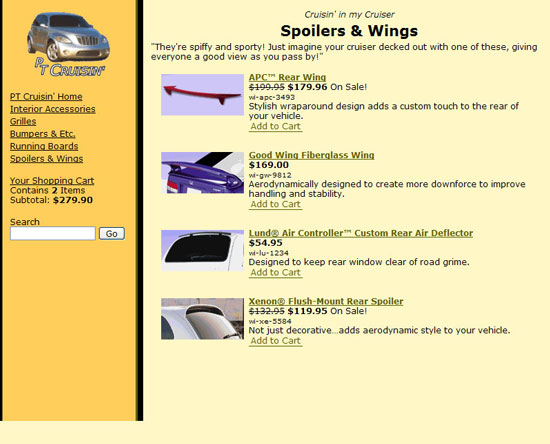
The Sidebar Theme is the newer version of the Lefty Theme. Links assigned to each page will show up in the left navigation bar below the page graphic and above the mini cart. The header and footer will appear at the top and bottom of the main content area.
Theme Colors & Backgrounds
Colors and background images for this theme can be modified under Preferences > Layout Settings.
- Text Color - used as the text color on your pages.
- Background Color - used as the background color for the main body of the page.
- Link Color - used as the hover color for the left navigation links. Also used as the color of the first line on the sidebar.
- Visited Link Color - used as the link color for both the left navigation links and links in the main body. Also used as the color of the second line on the sidebar.
- Active Link Color - used as the background color for the sidebar as well as the hover color for links in the main body of the page.
- Table Shade Color - used as the table shade color in the shopping cart.
- Background Image - if used the background image will override the background color.
Theme Files
- Sidebar - page template used by the Sidebar theme.
- DefaultCustomProductTemplate - product template used by the Sidebar theme.
- gc_default - gift certificate template used by the Sidebar theme. This template controls how the gift certificate order screen looks as well as the format for the printable and digital gift certificates.
- tellafriend_default - tell a friend template used by the Sidebar theme. This template controls how the tell a friend pop up looks as well as the format of the tell a friend email.
- sc_default - shopping cart template used by the Sidebar theme. This template controls the appearance of all the checkout screens as well as the customer email receipt.
- cr_default - customer registration template used by the Sidebar theme. This template controls the appearance of all the customer registration screens.
- search_default - search results template used by the Sidebar theme. This template controls the basic layout of the search results screen.
- search_link - page template which controls how the search results which are links are formatted.
- search_product - product template which controls how the search results which are products are formatted.
- Sidebar-Colors - VARS for the colors in the Sidebar theme.
- Sidebar-MiniCart.css - CSS controlling the mini cart for the Sidebar theme.
- Sidebar-MoreInfo.css - CSS on the product more information pages using the Sidebar theme.
- Sidebar-MoreInfoPage - include file formatting the product more information pages using the Sidebar theme.
- Sidebar.css - general CSS for the Sidebar theme.